This is default featured slide 1 title

Go to Blogger edit html and find these sentences.Now replace these sentences with your own descriptions.

This is default featured slide 2 title

Go to Blogger edit html and find these sentences.Now replace these sentences with your own descriptions.

This is default featured slide 3 title

Go to Blogger edit html and find these sentences.Now replace these sentences with your own descriptions.

This is default featured slide 4 title

Go to Blogger edit html and find these sentences.Now replace these sentences with your own descriptions.

This is default featured slide 5 title

Go to Blogger edit html and find these sentences.Now replace these sentences with your own descriptions.

Showing posts with label kitchen top router. Show all posts

Monday, 17 December 2012

NEW CNC Contourbreton NC 300 stone router

Hello,
Here is a video showing the NEW
Contourbreton NC 300 profiling machine.

On january I show you all the details about new CNC machine.
 
Click on mail@breton.it for more information about this new stone router.
By-by
Sergio Prior

Monday, 12 December 2011

BretonSmartCam MILL: Software CAD/CAM of shaping centres with 3 interpolated axes

BretonSmartCam MILL is a CAD/CAM software to draw and program complex stone work-pieces, for shaping centres with three interpolated axes.
The CAM module allows to carry out the following major functions:
- cutting and shaping with saw blade
- shaping, profiling, hole drilling, milling and hollowing out with millers or shaped tools
 - polishing of tops (even inclined tops)
- 3D engraving of Windows "True Type" fonts on flat horizontal or vertical surfaces
- bas-reliefs imported from digitized surfaces.
 The CAD module allows to carry out the following major functions:
- generation of 2D drawings with relevant dimensions.
- determination of the 3D working volume of the piece.
- determination of any working plane inside the generated 3D volume.
- management of a 2D drawing created on the selected working plane, no matter how it is oriented in the space.
- import of drawings in DXF and DWG format from external CAD or template detectors.
- positioning of the pieces to be produced directly on the image of the slab, so as to utilize its surface to the full.
- automatic programming and display of the vacuum cup arrangement on the worktable.
- interface with the software of a possible laser projector for arranging the vacuum cups on the worktable.

 - interface with the software of a possible bas-relief digitizer.

- generation of 3D models of the pieces.
- import of surfaces and solid models in IGES, STL, STEP and 3DM format.
- generation of surfaces and bas-reliefs from image processing.
- generation of 2D drawings of vanity and kitchen tops, whose dimensions are set starting from a basic template.
The 3D SOLID SIMULATION module allows:
- to check any possible tool-piece and/or tool-machine collision
- to calculate the raw material remaining after the machining

The software operates in a Windows environment, is intuitive and user-friendly.
N.B. The software features may be limited by the technological and operational features of the machine. 


Tuesday, 2 August 2011

The web site www.breton.it was totally rebuilt

 We made a considerable restyling using modern and high impact graphics
Site navigation is now easier
 
We focused on contents by enriching our machines with photos, videos, more comprehensive texts, catalogues and technical sheets.


Enjoy your navigation! www.breton.it!
.

Friday, 1 July 2011

Thursday, 15 July 2010

Contourbreton NC260K - Cleaning the vacuum pump


Instructions for cleaning the vacuum pump

1 - Tools required
Jug
Funnel
Hex wrench 11
Hex wrench 30
Strap wrench         
Allen wrench 6
T-handle wrenches with hexagonal opening

2 - Ensure the machine is safe to work on before proceeding with maintenance
Steps to follow:
1- Turn the key selector switch “Maintenance” to the left.
2- Press the button “Open doors”
3- Open the doors                            
4- Turn the key selector switch “Auxiliary” to the left.

3- Drain  old and used oil
Steps to follow:
1 – Open the tap for draining  the oil
2 – Drain oil completely
3 – Close tap

4 - Change oil filter
Steps to follow:
1 – Unscrew the filter cartridge and collect the oil
2 – Grease the seal on the new filter cartridge
3 – Screw the filter cartridge and clean any excess oil

5 - Fill with oil
Steps to follow:
1 – Unscrew the cap on the oil tank
2 – Fill the oil tank with 2 L of new oil
3 – Using the level indicator positioned on the tap check oil level
4 – Replace and screw on tank cap

6 - Removing bracket
Steps to follow:
1 – Unscrew the two pairs of screws used to secure the bracket for the air filter dome cover. 
2 – Move the bracket to access and remove the exhaust filters
7 - Replace exhaust filters
Steps to follow:
1 – Unscrew the 4+4 screws which secure the filter covers in place, remove filter covers.
2 – Unscrew and remove the brackets which secure the filters in place.
3- Remove the two exhaust filters.
4- Screw the 8 screws which secure cover LH side.
5 – Mount the new filters and secure in place with the brackets.

8 - Replace air filter positioned downstream from tank.
Steps to follow:
1 – Unscrew the filter holder dome cover, remove the filter and clean the dome cover with water.
2 – Replace filter and screw dome cover in place.

9 - Replace bracket
Steps to follow:      
1 – Position the bracket and screw the 2+2 screws used for securing the bracket to the tank.

10 - Replace air filter positioned upstream from tank.
Steps to follow:
1 – Unscrew the filter holder dome cover, remove the filter and clean the dome cover with water.
2 – Replace filter and screw dome cover  in place.

Thursday, 20 May 2010

Contourbreton NC260K - Changing clamp for tool rack magazine

1- Tools required
- Allen wrench 4
- Pin punch
- Hammer
- Cross slot screwdriver


2 – Ensure the machine is safe to work on before proceeding with maintenance
Turn the key selector switch “Maintenance” to the left
Press the button “open doors”
Open the doors
Turn the key selector switch “Auxiliary” to the left


3 – Removing clamp
Unscrew the 2 screws which secure the clamp to the tool magazine


4 – Remove pin and plate
With the aid of the pin punch and hammer remove the pin.
Unscrew the plate


5 – Mount pin and plate
With the aid of the hammer position and insert the pin into the purpose hole.
Replace and screw the plate in position 


6- Mounting clamp
Insert the pin into the purpose hole.
– Screw and secure the 2 screw fixtures. 


7 – Testing clamp
To verify the clamp  has been replaced correctly, insert and extract a tool holder cone several times. 


The END

Tuesday, 16 March 2010

A precision range

CONTOURBRETON NC 600
 
Breton turns to marble workshops its offer for Fabshop Machines, which includes a wide selection of bridge saws, profiling machines, shaping centres with several controlled axes, edge polishers and multipurpose solutions, each one specially conceived and developed to meet the most demanding customers' needs, whatever their requirements.An outstanding solution in this offer is unquestionably the new Contourbreton NC 600 profiling machine. Compact, ergonomic, aesthetically attractive, it is available in two different models which differ as to workbench dimensions and "Y" axis travels, yet are equally capable to ensure a machining top precision thanks to their structural rigidity, even when subjected to heavy stresses.Contourbreton NC 600 features a mobile beam structure offering a sizable room for manoeuvre for the loading and unloading operations, is equipped with sliding doors that can be manually opened and have an accident-prevention and sound-deadening function, and houses both a wide and easily accessible workbench with slots for fixing mechanically the pieces to be machined, and a carrousel tool-store with 32 cells.The planning strategy underlying these machines attached great importance to each single structural component that typifies them; such components have been specially tailored so as to ensure superior resistance, productivity and safety. Here under some of the most interesting ones:
- powerful electrospindle cooled by electric refrigerator;
- digitally-controlled motors;
- tool cooling system with both inside and outside water feeding;
- spindle vertical travel of 600 mm, with a distance between spindle nose and worktable of 750 mm, which enables dishing operations on small blocks;
- vacuum circuit with frontal external controls;
- rapid shifts up to 60 m/min;
- HSK-B80 tool taper;
- exclusive software for polishing horizontal and inclined tops;
- Siemens Sinumerik 840D SL CNC control unit;
 
- control board placed inside a pendant and swivelling console, which includes keyboard, colour touch-screen and USB port and whose functions can be "duplicated" through a portable button strip that is cable-linked to the console;
- service electrical equipment housed in cabinets with IP 54 protection rating;
- modem or Ethernet connection for the on-line connection with Breton, to enable the remote diagnosis thus reducing dramatically the time required to remove any possible malfunction.

Make way for optional accessories !
Besides the specific software consisting of high-performance and easy-to-understand CAM based on parametric macros, which can be modelled off-line to execute machining operations following those underway, optimize the work cycles and draw up accurate production statistics, the following optional accessories are also available:
- contact meter with radio transmission, detecting the real spatial position of the tops to be machined 
- laser positioning device, showing the exact point where the operators must fix the vacuum cups to the bench
- laser projector, projecting the outline of both the pieces to be produced and the single vacuum cups to be arranged on the worktable surface  
- laser touch probe to control the tool profile, diameter and length
- device for the "C" axis continuous rotation, enabling to use the cutting unit with vertical saw blade to carry out rectilinear cuts, convex saw blade to carry out curvilinear cuts, or 45° saw blade to carry out inclined cuts
 

- 90° milling head to perform engravings or milling works on the side of small blocks 
- special head performing rabbets with constant depth 
- inclinable spindle, which can be manually adjusted from -5° to +5°, to carry out the inclined stock removal
- vacuum cups with mechanical locking 
- worktop made of aluminium alloy and double-effect vacuum cups
- 3D "laser scanner" optic precision system and relevant software, enabling to detect the shape and dimensions of the pieces to be copied without any contact, and to program the appropriate machining by simulating the final result 
 
- head to make drips
 
- double tool taper, which allows to use two overlapped tools for producing profiles up to 3 cm
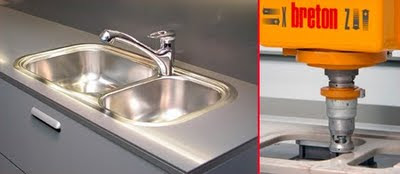
- kits required to realize the sink hole with 90° sharp corner and polished inside edge